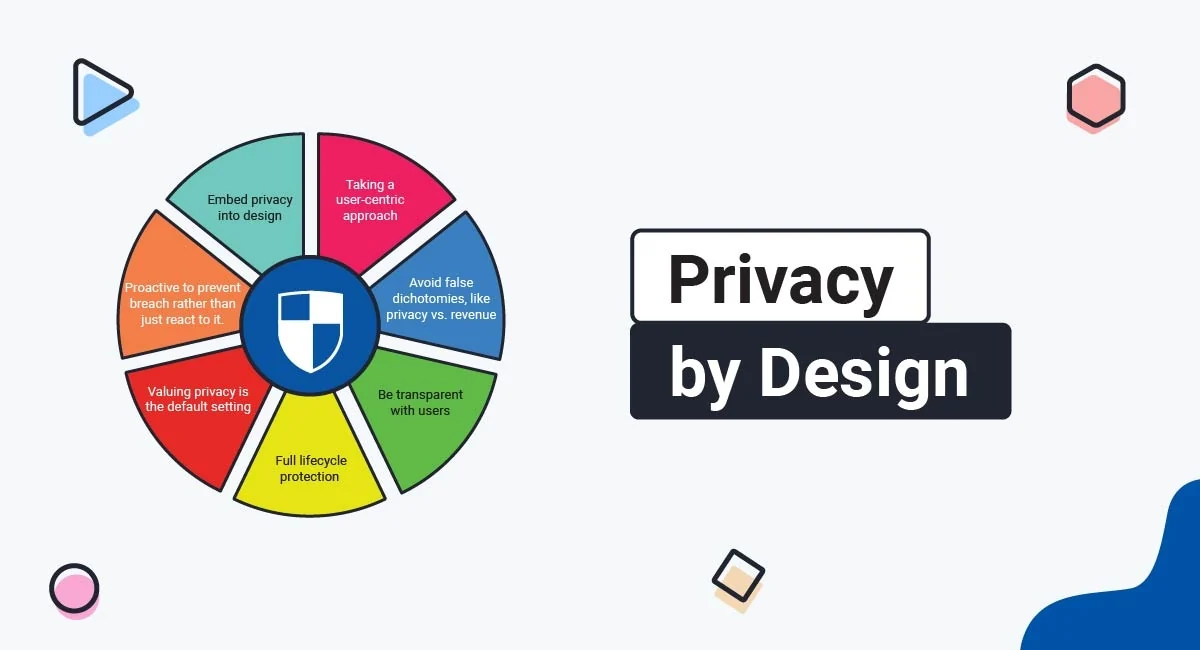
Privacy should not be an afterthought added when a website launches or an app starts collecting user information. Privacy by Design is an approach that builds data protection into products, services, and business processes from the beginning. For website owners, developers, startups, and product teams, it means creating digital experiences that collect less personal information, protect the data they need, and give users meaningful control.
What Is Privacy by Design?
Privacy by Design is a framework for incorporating privacy and data protection into the architecture, development, operation, and maintenance of a product or service. Rather than treating privacy as a separate legal or technical requirement, organizations consider it during planning, design, development, testing, and future updates.
The concept is closely connected to the data protection by design and by default requirements in Article 25 of the European Union’s General Data Protection Regulation (GDPR). Organizations subject to the GDPR must implement appropriate technical and organizational measures to apply data protection principles effectively and protect individual rights.
The distinction between the two ideas is important:
Privacy by Design
Privacy safeguards are incorporated into the product’s architecture, features, data flows, and development process before personal information is processed.
Privacy by Default
The initial settings provide strong privacy protection. Users do not have to search through menus to prevent unnecessary collection or exposure of their information.
For example, a social networking app could make profiles private by default, collect only the information necessary to create an account, and require a separate decision before enabling optional location sharing.
Seven Privacy by Design Principles to Understand
Privacy by Design is commonly associated with seven foundational principles. They offer a useful way to evaluate whether a website or app protects users throughout its lifecycle.
1. Proactive, Not Reactive
Identify privacy risks before they become incidents. Developers should review what information a feature will collect, who can access it, and what could happen if it is exposed or misused.
2. Privacy as the Default Setting
Users should receive meaningful protection without having to configure every setting themselves. Optional tracking, public profiles, and unnecessary data sharing should not be automatically enabled simply because they benefit the business.
3. Privacy Embedded Into Design
Privacy should influence database structures, application programming interfaces (APIs), user interfaces, analytics, authentication, and software architecture. It should be part of technical planning, not a final compliance review.
4. Full Functionality Without Unnecessary Trade-Offs
Good privacy design aims to protect information while preserving useful functionality. A shopping website, for instance, can process an order without requiring access to a customer’s contact list or precise location.
5. End-to-End Security
Protection should continue throughout the information lifecycle, from collection and transmission to storage, access, retention, and deletion. Encryption, secure authentication, monitoring, and controlled access are important safeguards.
6. Visibility and Transparency
Explain what information is collected, why it is needed, how it is used, and whether it is shared. Privacy notices should be understandable and available when users need them.
7. Respect for User Privacy
Give people practical control over their information. This includes clear choices, accessible privacy settings, fair consent mechanisms, and straightforward ways to exercise applicable data protection rights.
How to Implement Privacy by Design: 10 Practical Steps
A company does not need to build an entirely new technology platform to start improving privacy. Many improvements can be introduced through better planning, simpler data collection, more secure configurations, and regular reviews.
Map the Personal Data You Collect
Start by identifying every type of personal information your website or app collects. Include information users submit directly, data generated through their activity, tracking identifiers, and information received from external services.
Common examples include:
- Names, email addresses, and telephone numbers.
- Account credentials and authentication identifiers.
- IP addresses, cookies, and device identifiers.
- Payment and transaction information.
- Location data and device permissions.
- Browsing activity, analytics events, and usage history.
Create a data inventory that records where information comes from, where it is stored, who can access it, and whether it is shared with vendors or other organizations.
Collect Only What You Actually Need
Data minimization is one of the most effective ways to reduce privacy risk. Every additional field can create another potential security, compliance, or retention responsibility.
Consider a newsletter subscription form. If the only purpose is sending email updates, an email address may be sufficient. Requiring a full name, birth date, postal address, and telephone number creates unnecessary friction and additional data protection obligations.
Define a Clear Purpose for Every Data Field
Document why each category of personal information is required. Avoid collecting data simply because it might become useful for advertising, personalization, or future product development.
A purpose-and-data table can help product teams make decisions:
| Data collected | Possible purpose | Privacy consideration |
|---|---|---|
| Email address | Account creation and essential notifications | Do not automatically enroll users in unrelated marketing. |
| Delivery address | Shipping an order | Restrict access and retain it according to a defined schedule. |
| Approximate location | Showing nearby services | Consider whether manual location selection is sufficient. |
| Analytics events | Understanding product performance | Limit identifiers and avoid collecting unnecessary sensitive details. |
| Payment details | Processing transactions | Use appropriately secured payment providers and avoid storing card data unnecessarily. |
Use Privacy-Friendly Default Settings
Review every setting that affects the visibility, sharing, or processing of personal information. The default configuration should expose as little information as reasonably possible while allowing the service to function.
- Set new user profiles to private where appropriate.
- Disable optional tracking until a valid choice or other applicable legal basis is established.
- Avoid public display of email addresses and telephone numbers.
- Make optional marketing subscriptions separate from essential account registration.
- Restrict access to uploaded documents and user-generated content.
Design Clear Consent and Privacy Controls
When consent is the appropriate legal basis, make the choice specific, informed, freely given, and easy to withdraw. Do not hide the refusal option or use confusing interface patterns to pressure people into accepting unnecessary tracking.
A privacy-friendly cookie interface should explain the relevant categories, provide a meaningful way to reject non-essential cookies, and allow users to change their preferences later. Essential technologies and optional advertising or analytics technologies should not be treated as if they all serve the same purpose.
Also remember that consent is not the correct legal basis for every processing activity. Organizations need to identify and document the applicable legal basis under the laws that govern their activities.
Protect Information With Strong Security Controls
Privacy and security are closely connected. A product that collects very little data can still create serious risks if its database, accounts, or APIs are poorly protected.
- Encrypt sensitive information during transmission and, where appropriate, at rest.
- Use secure password hashing rather than storing readable passwords.
- Enable multi-factor authentication for administrative accounts.
- Apply role-based access controls and least-privilege permissions.
- Keep software, libraries, plugins, and server components updated.
- Use secure backups and test recovery procedures.
- Monitor unusual access patterns and security events.
Set Data Retention and Deletion Rules
Personal information should not remain in a system indefinitely without a valid reason. Establish retention periods based on the purpose of processing, legal requirements, contractual obligations, and operational needs.
For example, a service might delete abandoned registration records after a defined period, remove temporary verification codes quickly, and retain transaction records only as long as required for accounting or other applicable obligations.
Deletion procedures should cover more than the main database. Consider backups, analytics systems, support tools, exported files, and third-party processors. Where immediate deletion from backups is not technically practical, document the safeguards and ensure deleted information is not restored into active use.
Review Third-Party Services and SDKs
Websites and apps often depend on external providers for analytics, advertising, customer support, payments, maps, authentication, and crash reporting. These integrations may receive information that the product team does not directly see.
Before adding a third-party tool, ask:
- What information does the service collect?
- Does it use information for its own purposes?
- Where is the information stored and processed?
- Does it share information with additional providers?
- Can collection be disabled or reduced?
- Are appropriate contractual and security safeguards in place?
Maintain a current list of vendors and remove integrations that are no longer necessary. A service that was appropriate during development may become unnecessary as the product evolves.
Evaluate Privacy Risks Before Launch
Review how the product could affect users before releasing a new feature. Consider accidental exposure, excessive collection, unauthorized access, unexpected sharing, and risks to vulnerable groups.
A Data Protection Impact Assessment (DPIA) may be required under the GDPR when processing is likely to result in a high risk to individuals’ rights and freedoms. Even when a formal DPIA is not required, a documented privacy risk assessment can help teams identify problems early.
Monitor, Test, and Improve Continuously
Privacy work does not end when a website or app goes live. New features, vendors, software updates, business models, and regulatory developments can change the risks associated with personal information.
Schedule periodic reviews of data flows, permissions, access logs, retention rules, privacy notices, and vendor integrations. Include privacy checks in development workflows so that significant changes are reviewed before deployment.
Privacy by Design for Websites: What Should You Implement?
Website owners should pay particular attention to forms, cookies, analytics, advertising scripts, account systems, and third-party plugins. These components can collect information even when visitors do not actively submit a form.
Use Minimal Registration and Contact Forms
Review every field on your forms. If a contact form only needs to receive a question, do not require a visitor’s date of birth, home address, or other unrelated information. Make optional fields clearly optional.
Configure Cookies and Tracking Carefully
Audit cookies, pixels, tags, and similar technologies. Identify their purpose, provider, duration, and whether they involve personal information or require consent under applicable rules. Avoid loading non-essential tracking technologies before the required choice has been obtained.
Review Analytics Configuration
Configure analytics tools to avoid collecting information that is not needed for measurement. Do not place email addresses, passwords, payment details, or sensitive form content inside URLs or analytics event parameters.
Secure the WordPress Environment
WordPress site owners should review plugins, themes, hosting configuration, user roles, database access, and backup procedures. Remove unused plugins and accounts, apply security updates promptly, and avoid giving every administrator or contributor unrestricted access.
- Use HTTPS across the entire website.
- Restrict access to the WordPress administration area.
- Use individual accounts instead of shared administrator credentials.
- Review plugins that add analytics, advertising, forms, or tracking scripts.
- Limit personal information stored in comments and contact submissions.
- Protect backups and database exports from public access.
Make Privacy Choices Easy to Find
Provide an accessible privacy policy and a clear way for users to contact the organization. If users can manage cookie preferences or request access, correction, or deletion of their information, make those controls easy to locate.
Privacy by Design for Mobile Apps
Mobile applications require additional attention because smartphones contain sensors and information sources that may reveal highly personal details. An app may request access to a camera, microphone, contacts, photos, precise location, or other device features.
Request Permissions Only When Needed
Do not request every permission during the first launch. Ask for access when the user activates a feature that genuinely needs it, and explain the reason in clear language.
For example, a navigation app may need location access while providing directions. A simple note-taking app generally should not need continuous access to a user’s location.
Prefer Limited Access to Device Data
Where the operating system supports it, use limited photo selection, approximate location, or temporary permissions instead of requesting unrestricted access. Provide a manual alternative when practical.
Check Third-Party SDK Behavior
Software development kits can transmit identifiers, diagnostics, advertising information, and other data to external providers. Review their documentation and actual behavior before including them in an app.
Secure Local Storage
Avoid storing sensitive information in plain text or insecure local files. Use platform-supported secure storage for credentials and tokens, protect local databases, and clear information when it is no longer required.
Provide In-App Privacy Controls
Users should be able to review relevant privacy settings without having to search through unrelated screens. Depending on the app, this may include location permissions, marketing preferences, account visibility, connected services, and account deletion options.
Practical Example: Building a Privacy-Friendly Shopping App
Imagine a small business developing a mobile shopping application. The original plan includes account registration, product recommendations, payment processing, location-based offers, and marketing notifications.
A Privacy by Design review can improve each part of the experience before launch:
| Feature | Potential privacy problem | Better design decision |
|---|---|---|
| Registration | Requiring excessive personal details. | Collect only information needed to create and manage the account. |
| Recommendations | Tracking all browsing behavior indefinitely. | Use limited, transparent personalization and appropriate retention periods. |
| Payments | Storing payment details without a clear need. | Use a suitable payment provider and minimize stored payment information. |
| Location offers | Collecting precise location continuously. | Request location only when needed and consider less precise alternatives. |
| Notifications | Automatically enabling promotional messages. | Separate optional marketing choices from essential service notifications. |
| Account closure | Leaving personal information in active systems without a retention reason. | Provide an account closure process and apply documented deletion or retention rules. |
The result is not simply a more secure application. It is a product with fewer unnecessary data flows, clearer user choices, and a more manageable privacy risk profile.
Privacy by Design Checklist for Websites and Apps
Use this interactive checklist to review the main privacy safeguards in a digital product. It is a practical starting point, not a formal certification or legal compliance assessment.
Implementation checklist
Common Privacy by Design Mistakes to Avoid
Collecting Data Just in Case
Gathering information without a defined purpose increases exposure and makes it harder to explain why the data is necessary. Collect information based on actual product requirements, not hypothetical future uses.
Assuming a Privacy Policy Solves Everything
A privacy policy explains practices, but it does not replace appropriate technical and organizational safeguards. A clear notice cannot compensate for excessive collection, insecure storage, or misleading consent interfaces.
Making Privacy Settings Difficult to Understand
Complicated menus, confusing labels, and unequal choices can undermine user control. Use plain language, balanced options, and settings that are easy to access.
Ignoring Third-Party Data Collection
An organization may carefully manage its own database while overlooking information transmitted through advertising scripts, analytics tools, plugins, or mobile SDKs. Review the complete data flow, not just the systems you own.
Waiting Until After Launch
Fixing privacy problems after a product is already in use can require expensive redesigns, database changes, vendor negotiations, and user notifications. Include privacy reviews in product planning and development milestones.
Forgetting That Privacy Is Ongoing
A feature that was low-risk at launch may become more sensitive after new integrations or changes in how information is used. Reassess privacy whenever processing activities change significantly.
Privacy by Design and Legal Compliance
Privacy by Design is both a technical approach and an important part of data protection governance. The GDPR explicitly addresses data protection by design and by default in Article 25. Other jurisdictions have their own privacy laws, security requirements, and rules concerning cookies, online tracking, consumer information, and children’s data.
Requirements vary according to the organization, the people whose information it processes, the nature of the data, and the countries involved. A website serving customers in multiple jurisdictions may need to consider several legal frameworks rather than relying on one universal privacy policy.
Organizations should also keep records of important privacy decisions, vendor arrangements, risk assessments, and security measures. Demonstrating how privacy considerations influenced product design can be an important part of accountability.
Frequently Asked Questions About Privacy by Design
What is Privacy by Design in simple terms?
Privacy by Design means building privacy protection into a website, app, or digital service from the beginning. It includes collecting less personal information, securing necessary data, limiting access, and giving users meaningful control.
Is Privacy by Design required by the GDPR?
Yes. Article 25 of the GDPR establishes data protection by design and by default requirements for organizations subject to the regulation. They must implement appropriate technical and organizational measures and consider privacy throughout processing activities.
What is the difference between Privacy by Design and Privacy by Default?
Privacy by Design means incorporating privacy safeguards into the development and operation of a product. Privacy by Default means that the initial settings provide strong protection and limit processing to what is necessary for the specified purpose.
How can a small business implement Privacy by Design?
Start with a data inventory, remove unnecessary form fields, configure privacy-friendly settings, secure accounts and databases, review third-party tools, establish retention rules, and provide clear privacy information. These steps can be introduced gradually.
Does Privacy by Design apply to WordPress websites?
Yes. WordPress websites should review plugins, cookies, analytics, forms, user permissions, hosting security, backups, and data retention. The same principles apply whether a website is custom-built or uses a content management system.
Do mobile apps need special privacy protections?
Yes. Mobile apps may access location, cameras, microphones, contacts, photos, and other device features. They should request permissions only when needed, explain why access is required, and use the least intrusive permission available.
What is a Data Protection Impact Assessment (DPIA)?
A DPIA is a structured assessment of how a processing activity may affect individuals’ rights and freedoms. Under the GDPR, it is required for processing likely to result in a high risk. It helps organizations identify and reduce risks before processing begins.
Can Privacy by Design improve customer trust?
Yes. Clear explanations, sensible default settings, limited data collection, and reliable security can make users more confident about a digital service. Privacy-friendly design can also reduce unnecessary operational and compliance risks.
How often should a company review its privacy practices?
Privacy practices should be reviewed regularly and whenever a significant change occurs, such as introducing a new feature, adding a third-party provider, changing data uses, or entering a new market. The review frequency should reflect the nature and risks of the processing.
Official Resources and Further Reading
The following resources provide additional guidance for organizations developing privacy-friendly websites, apps, and digital services:
- European Commission: Data Protection Obligations — overview of data protection by design and by default.
- European Data Protection Board: Privacy by Design and by Default — guidance and regulatory resources.
- UK Information Commissioner’s Office: Data Protection by Design and by Default — practical implementation guidance.
- ICO: Designing Products That Protect Privacy — resources for digital product teams.
- NIST Privacy Framework — a voluntary framework for identifying and managing privacy risks.